
Government Website Design: What the Rules Actually Require
A public website can be shaped by more than a design preference. For a federal agency, a statute and an OMB policy memo set expectations for digital services. State and local governments have a separate accessibility rule to account for. Knowing which requirements apply to which level of government is a useful place to begin.
This guide summarizes the published requirements and points to their sources. It is an orientation, not legal advice or a determination of any government’s obligations.
What federal policy asks of government website design
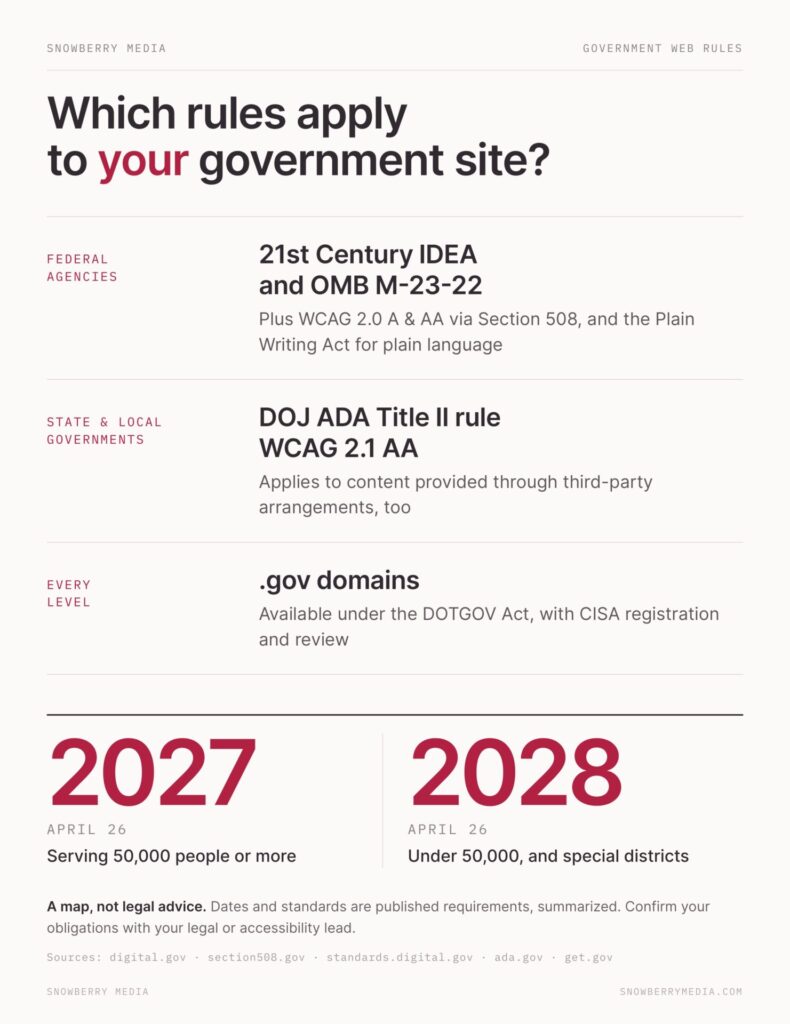
The 21st Century Integrated Digital Experience Act, signed in December 2018, requires executive branch agencies to modernize websites, digitize services and forms, accelerate e-signatures, improve customer experience, and standardize and transition to centralized shared services. In September 2023, the Office of Management and Budget issued M-23-22, “Delivering a Digital-First Public Experience,” with further policy requirements for agency websites and digital services. Digital.gov summarizes the act and memo.
M-23-22 calls for websites, digital services, web applications, and mobile applications to be:
- Accessible to people with diverse abilities.
- Consistent in visual design and agency brand identity.
- Authoritative and easy to understand.
- Discoverable and optimized for search.
- Secure by design and secure by default.
- User-centered and data-driven.
- Customized and dynamic.
- Designed mobile-first to scale across device sizes.
The memo rescinded an earlier 2016 website policy memo, M-17-06. For new or redesigned federal websites, digital services, and forms, it set March 20, 2024, as the date by which the requirements were expected to be met. Existing sites and services are expected to be prioritized for remediation or digitization.
These policies concern federal executive branch agencies. They should not be treated as a single set of rules for every level of government.
Accessibility requirements differ by level of government
For covered federal electronic and information technology, including web content, the Revised Section 508 Standards incorporate WCAG 2.0 Level A and Level AA success criteria. The Section 508 applicability and conformance guidance explains how the standards apply to electronic content.
For web information and services provided by state and local government entities, the Department of Justice’s ADA Title II rule sets WCAG 2.1 Level AA as the technical standard. Following a one-year extension in April 2026, the compliance date is April 26, 2027, for entities with a total population of 50,000 or more. It is April 26, 2028, for entities under 50,000 and for all special district governments. The rule applies to content an entity provides directly or through third-party arrangements.
The DOJ’s first-steps guide provides the published dates and planning information. This walkthrough of the 2027 ADA rules covers where to start on the practical side. Requirements can depend on an entity’s circumstances; consult the appropriate legal or accessibility lead for guidance specific to your organization.

Plain language is a federal requirement
The Plain Writing Act of 2010 requires federal agencies to use clear, concise, well-organized plain language in public-facing documents, written for the intended audience to understand the first time they read or hear them. Digital.gov’s Plain Writing Act resource explains the requirement.
For a service page, this means putting the practical information where a person needs it: who can use the service, what they need to provide, how to apply, and what happens next. Use headings that describe the content beneath them. Explain unfamiliar terms. If a person needs to complete a form, give instructions before they reach the field that requires them.
Plain language is not a final polish pass. It affects whether someone can find and use the service.
Use a design system without losing agency identity
Federal website standards moved to standards.digital.gov on September 26, 2024. The standards provide a reference point for federal agencies as they build and maintain public-facing digital services.
The U.S. Web Design System (USWDS) is an open-source toolkit agencies use to meet federal web standards. It includes components and patterns, with contributions from people inside and outside government. A shared system gives teams a starting point for common interface decisions while allowing consistent agency identity.
For a project team, the practical question is how the chosen patterns will be used: which components fit the service, how they support the agency’s brand, and how staff will maintain them as the site changes.
Make forms and services usable from start to finish
M-23-22 asks federal agencies, to the greatest extent practicable, to make forms available digitally and services available through a digital channel that maximizes self-service completion. It also says not to require a wet signature or in-person identity proofing without offering an equivalent digital method.
A digital form is not automatically a usable service. People need to understand the steps, know which fields are required, and recover when something goes wrong. Clear instructions, useful error messages, and a confirmation when a submission is complete help make the process understandable from beginning to end.
Where a digital alternative is needed for a signature or identity check, it should be part of the service design rather than an afterthought. The policy’s “to the greatest extent practicable” language matters; the memo sets out the expectation, but this article does not assess whether a particular agency’s process meets it.
Design for mobile use
Digital.gov reports roughly 2 billion visits to federal websites each month, with more than half occurring on mobile devices. M-23-22’s mobile-first requirement reflects how people access public information and services.
In practical terms, pages need to work at narrow screen widths, and forms should not require unnecessary scrolling, tiny controls, or awkward typing. Keep page content focused and avoid adding heavy elements that slow the experience. Test the actual tasks on a phone: finding a service, reading instructions, filling in fields, and submitting a request.

A .gov domain is a trust and planning decision
Under the DOTGOV Act, .gov domains are available to eligible U.S.-based government organizations at federal, state, local, tribal, and territorial levels, as well as courts and other publicly controlled entities, subject to CISA’s registration requirements. Registration includes identity verification through Login.gov and review before approval, so it takes planning.
The get.gov guide to moving to .gov covers eligibility and transition steps. A domain change affects more than the address in a browser: staff need to account for links, email, content references, and communications about the move. A recognizable .gov address and HTTPS connection also help visitors identify an official, secure government website.
A practical order for getting started
Before design work begins, establish what the site needs to do and what content it contains. A manageable sequence is:
- List the public’s top tasks. Identify the services, forms, and information people come to find or complete.
- Review existing content. Note duplicate, outdated, or unclear pages and decide what should be updated, consolidated, archived, or removed.
- Test the accessibility baseline. Review key pages and service flows, and record what needs further investigation.
- Assign content ownership. Decide who updates pages, forms, documents, and service information after launch.
- Scope the design and build. Use the task list, content review, testing findings, and ownership plan to set project priorities.
That order helps teams define the work before choosing layouts or features. If you need the phases laid out end to end, our website redesign project plan walks through goals, audit, content strategy, build, and launch. It also makes it easier to distinguish a redesign from a content migration or service improvement project.
Questions to include in a project brief
Whether you are writing a brief or evaluating a vendor, ask for specifics:
- Who will be able to update content after launch, and what training is included?
- How will the build map to relevant USWDS patterns and components?
- How will accessibility be tested, and what results will be documented?
- What will happen to existing PDFs and other files?
- How will content be reviewed, migrated, and redirected?
- Who will own ongoing updates to templates, forms, and service information?
Clear answers help define responsibilities while there is still time to plan for them. If the content management system is still open, our comparison of CMS options for local government websites covers what to weigh.
Planning the work with Snowberry Media
Snowberry Media starts with strategy before design: clarifying audiences, services, content, and project goals. We build WordPress websites that are handed over so government staff can publish and manage updates. Accessibility is planned from the start, not left for a final scan. To discuss a redesign, see our website redesign services.
similar resources

Best Website Builder for Nonprofits: What to Compare Before You Commit

Looking for a Nonprofit Website Redesign? Here Are 10 Things You Should Know

Nonprofit Branding: Why Your Website Doesn’t Match Your Mission (and How to Align Them)
