
What a Website Redesign Actually Costs (and How to Budget for One)
“Can we get a budget for the website upgrade?” comes up near the end of a planning meeting. The team has already named the problems: program information is difficult to manage, the donation and CRM systems don’t connect cleanly, or the website no longer reflects the organization’s size. Now someone needs a figure the board can consider.
There isn’t one reliable price tag without knowing what the project includes. A useful estimate starts with the work itself: what needs to change, what can stay, and what your team can take on. If you’re still deciding whether the site needs a refresh or a full rebuild, start with seven signs your nonprofit has outgrown its website. If you’ve recognized the problem, the next step is scoping a solution that fits.
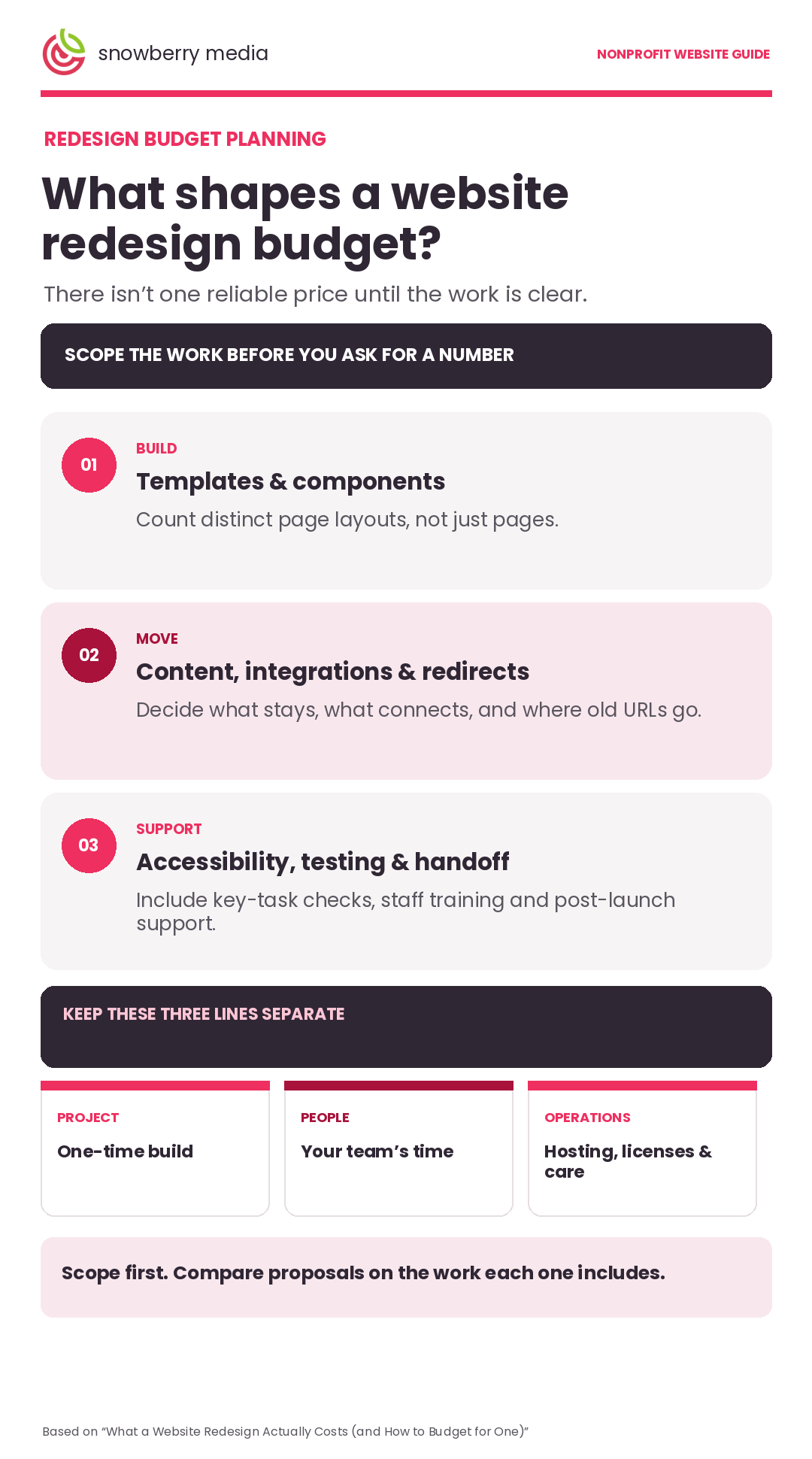
What shapes website redesign cost?
The number of pages on your current site is only part of the picture. What matters is how much distinct design, content, functionality, and testing the new site needs.
- Page templates and components: A site with dozens of program pages may need only a few reusable layouts. A smaller site can still require more design and development if it has a unique event directory, resource library, or campaign experience. Ask proposals to distinguish page count from the number of unique templates and components.
- Content decisions: Moving existing copy as-is takes different effort from reviewing, rewriting, combining, or retiring it. If staff are unsure which pages should stay, allow time for a content inventory before migration begins.
- Integrations: Name the systems the site needs to connect to (such as your CRM, donation platform, email tools, or analytics) and specify what each connection should do. “CRM integration” is not a complete scope. Mapping data, tracking form submissions, and testing donation flows all take planning.
- Data migration and redirects: Moving content, preserving useful metadata, and mapping old URLs to relevant new pages are separate tasks. Redirects and analytics continuity deserve a place in the project plan, not a hurried check on launch day.
- Accessibility and testing: Include accessibility expectations in design, development, and review. Test key tasks, forms, and templates rather than relying on automated scans alone. If the work includes correcting existing PDFs or documents, spell that out too.
- Design approach: A custom design system gives you more tailored layouts. A well-planned component library can reduce repeated design and development work while keeping pages consistent. The right fit depends on what your organization needs to publish and manage.
- Training and post-launch support: Budget for a handoff that helps staff manage everyday updates, as well as a clear plan for support after launch.
Pricing models also affect how an estimate is presented. A fixed fee can make a defined scope easier to budget for; hourly work can suit tasks where the scope may evolve. Our guide to how web design agency pricing works explains the trade-offs. Either way, ask what’s included, what depends on your team, and how a scope change is handled.
Costs that may sit outside the agency quote
The project fee is only one part of the website redesign budget. Your organization may also need to set aside funds, and staff time, for work that isn’t included in a proposal.
Content takes time. Staff need to review program details, approve new copy, gather facts, and check that information is current. If professional copywriting is needed, confirm whether it’s included or scoped separately. Photography, image licensing, and permissions can also add work or expense.
Accessibility planning should account for documents already on your site. A new site won’t automatically make old PDFs accessible. Identify which documents need remediation, replacement, or removal, and decide who will handle them.
Also account for redirect mapping and SEO migration work, including reviewing important URLs and preserving relevant page titles and metadata. If you are moving to a new platform rather than refreshing the current one, our website migration checklist covers the steps that sit outside the design budget. After launch, set aside time to check that key pages, forms, donation paths, and tracking are working as expected.
Finally, include ongoing care in your planning: hosting, software and tool licenses, security updates, backups, technical support, and future improvements. These recurring costs are different from the one-time build. Keeping them separate helps the board see what launch requires and what it will take to operate the site afterward.

How to build a budget you can defend
A useful budget is based on a clear scope, not a number picked before anyone has agreed on the work. This approach gives you something concrete to discuss with leadership, staff, and potential partners.
- Start with the smallest scope that solves the problem. List the visitor tasks and staff needs the site must support. Separate requirements from improvements that can wait. A short brief can help; see our guide to creating a website design brief.
- Separate one-time and recurring costs. Put strategy, design, development, content, migration, testing, and launch in the project budget. List hosting, licenses, support, and maintenance as ongoing expenses.
- Include your team’s time. Identify who will review content, make decisions, test the site, and attend training. These hours are real project resources, even when they don’t appear on an agency invoice.
- Leave room for unknowns. Set aside a contingency based on the uncertainty in your scope. If the content inventory, integrations, or document remediation needs are not yet clear, acknowledge that before requesting a fixed estimate.
- Phase the work if the full scope won’t pass. Keep the core structure, essential integrations, and launch requirements together. Move lower-priority enhancements into a later phase with its own budget and plan. Our step-by-step redesign project plan can help you think through that sequence.
Bring a brief explanation to the budget meeting: what isn’t working now, what the proposed scope will change, what’s excluded, and what the organization will need to maintain afterward. That turns “we need a new website” into a decision people can evaluate.
A prompt you can copy
An AI assistant will not tell you what a redesign costs, and you should not ask it to. It will make a number up. What it can do is turn what you already know about your site into a scope you can correct, and a summary you can take into a meeting.
Paste this in, replacing the bracketed parts:
You are helping me scope a website redesign for [organization], a nonprofit with [number] staff and [number] programs.
What I know:
- Current platform: [e.g. Squarespace, WordPress]
- Roughly [number] pages
- What is failing: [e.g. staff cannot update program pages without help]
- Systems the site must connect to: [CRM, donation platform, analytics]
- Who maintains the site day to day: [role]
Do three things, and tell me plainly where you are guessing:
- Group our current pages into the template types a new site would need, and name the pages that probably do not earn their place.
- List the work items a proposal should cover, split into one-time build and recurring cost.
- Draft a one-page summary I can take to a board: what is not working, what the scope changes, what is excluded, and what we will need to maintain afterward.
Do not estimate prices. If something above is unclear, ask me up to five questions before you start.
Read what comes back against your own knowledge of the site. The page groupings will be partly wrong, because the assistant cannot see your navigation or your programs. Correct those first, then keep the parts that hold up. A draft you can argue with is faster than a blank page.
Refresh, rebuild, or a scoped sprint?
The right spend depends on whether the problem is a specific part of the site or the structure underneath it.
A refresh is a fit when the platform and page structure still serve your organization, but the design, content, or visitor journey needs attention. It can focus the investment on what needs to improve without replacing the whole site.
A rebuild makes sense when the current structure or editing setup no longer supports the way your organization works: programs have multiplied, important information is hard to organize, or staff can’t manage the updates the site depends on. A nonprofit website redesign guide offers more planning questions to help clarify the scope.
A scoped sprint is worth considering when the problems are real but contained: copy that needs rewriting, navigation that no longer fits, and a short list of fixes rather than a new structure. Snowberry Media runs these as a fixed-fee, one-week engagement for $999, covering a focused set of improvements rather than one isolated item or a whole rebuild. Read about the website tune-up to see whether that scope matches what you are facing.

How to compare proposals that aren’t for the same thing
A lower total doesn’t tell you whether two proposals cover the same project. Line them up on scope before you line them up on price.
Ask each provider to state in writing what they have assumed: how many templates they are pricing, which integrations are included and which are quoted separately, whether content migration and redirects are their work or yours, who handles accessibility testing, and what happens to the number if the scope moves. Two quotes that answer those five questions the same way are comparable. Two that don’t are not, whatever the totals say.
A proposal that leaves out migration or content work can carry the smaller number and still need a second budget later. One that spells the work out is easier to approve, because you can see what the price buys.
For a deeper checklist, use our guide to evaluating website proposals. If you’re at the early assessment stage, Snowberry’s free website audit can give your team a starting point for deciding what belongs in the scope.
similar resources

When the Donation Platform Fails Mid-Campaign: A Year-End Giving Contingency Plan

Website Migration Checklist: Moving Off a Starter Platform Without Losing Anything

Your Nonprofit Outgrew Its Website: 7 Signs It’s Time to Rebuild
